PaddleX Vehicle Attribute Recognition Pipeline: End-to-End Vehicle Detection and Multi-Attribute Recognition Guide
PaddleX Vehicle Attribute Recognition Pipeline: End-to-End Vehicle Detection and Multi-Attribute Recognition Guide
本文以飞桨 PaddleX 的车辆属性识别 Pipeline(vehicle_attribute_recognition)为主题,讲解其"车辆检测 + 车辆属性识别"串联式架构、官方模型选型与基准数据、命令行/Python 快速体验、结果结构化输出与可视化、配置化自定义、服务化/高性能/端侧部署,以及基于私有数据微调模块模型的完整实战路径。读完本文,你将掌握如何基于 PaddleX 在交通管理、智能停车、安防监控等场景中快速落地车辆类型、颜色等属性识别能力,并能将该 Pipeline 无缝集成进自己的业务系统。
1. 车辆属性识别 Pipeline 概览
车辆属性识别是计算机视觉系统中的关键组成部分,其核心任务是在图像或视频中定位车辆,并标定每辆车的具体属性,例如车辆类型、车身颜色等。该任务不仅要求准确检测出车辆,还要识别出每辆车细粒度的属性信息。
车辆属性识别 Pipeline 是 PaddleX 提供的一种端到端串行系统,用于完成车辆的定位与属性识别,广泛应用于交通管理、智能停车、安防监控、自动驾驶等领域。该 Pipeline 还提供了灵活的服务化部署方案,支持在多种硬件平台上使用多种编程语言进行调用;同时支持基于该 Pipeline 的自定义开发——你可以在自有数据集上对模块模型进行训练与优化,训练得到的模型可以无缝集成回 Pipeline 中。
从源码结构看,该 Pipeline 的实现位于 paddlex/inference/pipelines/attribute_recognition/pipeline.py,其中 VehicleAttributeRecPipeline 继承自通用属性识别基类 AttributeRecPipeline(entities = "vehicle_attribute_recognition"),而其基类 _AttributeRecPipeline 的推理逻辑正是"检测 → 按框裁剪 → 多标签分类"的串行流程。
1.1 Pipeline 的模块组成
车辆属性识别 Pipeline 包含两个模块,每个模块下提供多个官方模型:
- 车辆检测模块:负责在图像中定位每一辆车的边界框(bounding box)。
- 车辆属性识别模块:对裁剪出的每个车辆区域进行多标签分类,输出车辆类型、颜色等属性。
Pipeline 默认配置(见 paddlex/configs/pipelines/vehicle_attribute_recognition.yaml)如下:
pipeline_name: vehicle_attribute_recognition

SubModules:
  Detection:
    module_name: object_detection
    model_name: PP-YOLOE-L_vehicle
    model_dir: null
    batch_size: 1
    threshold: 0.5
  Classification:
    module_name: multilabel_classification
    model_name: PP-LCNet_x1_0_vehicle_attribute
    model_dir: null
    batch_size: 1
    threshold: 0.7
即默认使用 PP-YOLOE-L_vehicle 作为检测模型、PP-LCNet_x1_0_vehicle_attribute 作为属性识别模型;两个模块各自的 threshold 分别对应检测置信度阈值(0.5)与属性分类阈值(0.7)。
1.2 官方模型与基准数据
车辆检测模块可选的官方模型及基准如下(模型下载链接为推理模型 / 预训练模型):
| Model | Model Download Link | mAP 0.5:0.95 | GPU Inference Time (ms) [Normal Mode / High-Performance Mode] | CPU Inference Time (ms) [Normal Mode / High-Performance Mode] | Model Storage Size (MB) | Description |
|---|---|---|---|---|---|---|
| PP-YOLOE-S_vehicle | Inference Model / Training Model | 61.3 | 10.54 / 6.69 | 52.73 / 23.58 | 28.79 | Vehicle detection model based on PP-YOLOE |
| PP-YOLOE-L_vehicle | Inference Model / Training Model | 63.9 | 30.30 / 26.27 | 169.28 / 111.88 | 196.02 | Vehicle detection model based on PP-YOLOE |
车辆属性识别模块的官方模型及基准如下:
| Model | Model Download Link | mAP (%) | GPU Inference Time (ms) [Normal Mode / High-Performance Mode] | CPU Inference Time (ms) [Normal Mode / High-Performance Mode] | Model Storage Size (MB) | Description |
|---|---|---|---|---|---|---|
| PP-LCNet_x1_0_vehicle_attribute | Inference Model / Training Model | 91.7 | 2.53 / 0.67 | 2.73 / 1.10 | 6.7 | PP-LCNet_x1_0_vehicle_attribute is a lightweight vehicle attribute recognition model based on PP-LCNet |
选型建议:如果优先考虑模型精度,选择精度更高的模型;如果优先考虑推理速度,选择推理更快的模型;如果优先考虑模型存储体积,选择体积更小的模型。
测试环境说明:
- 测试数据集:车辆检测模型使用 PPVehicle 验证集;车辆属性识别模型使用 VeRi 验证集。
- 硬件配置:GPU 为 NVIDIA Tesla T4;CPU 为 Intel Xeon Gold 6271C @ 2.60GHz;其他环境为 Ubuntu 20.04 / CUDA 11.8 / cuDNN 8.9 / TensorRT 8.6.1.6。
推理模式说明:
| Mode | GPU Configuration | CPU Configuration | Acceleration Technology Combination |
|---|---|---|---|
| Normal Mode | FP32 Precision / No TRT Acceleration | FP32 Precision / 8 Threads | PaddleInference |
| High-Performance Mode | Optimal combination of pre-selected precision types and acceleration strategies | FP32 Precision / 8 Threads | Pre-selected optimal backend (Paddle/OpenVINO/TRT, etc.) |
1.3 源码视角:Pipeline 内部调用链
从源码实现看,车辆属性识别 Pipeline 的推理链路清晰可循。_AttributeRecPipeline.__init__(pipeline.py 中 __init__ 方法)会从配置中分别创建检测模型(self.det_model)与分类模型(self.cls_model),并实例化 CropByBoxes() 裁剪组件与 ReadImage(format="BGR") 图像读取器;同时从配置中读取两个模块的默认阈值。
其 predict 方法(pipeline.py 中 predict 方法)的执行流程为:
- 通过
ImageBatchSampler对输入进行批处理采样; - 用
ReadImage读取 BGR 格式原始图像; - 调用检测模型得到所有车辆的检测框(
det_model(raw_imgs, threshold=det_threshold)); - 对每个检测框,通过
CropByBoxes裁剪出车辆子图,送入多标签分类模型(cls_model(img_list, threshold=cls_threshold))得到属性标签与置信度; - 由
get_final_result将检测框坐标、检测分数、属性标签、属性分数组装成结构化结果,包装为AttributeRecResult返回。
这也印证了该 Pipeline "端到端串行"的本质:检测模块先定位,属性模块再逐个识别,两个模块既可以整体使用,也可以单独替换或微调。
2. 快速开始
PaddleX 提供的所有模型 Pipeline 均支持快速体验。你可以在社区平台在线体验车辆属性识别 Pipeline 的效果,也可以在本地通过命令行或 Python 方式体验。
2.1 在线体验
可以通过识别官方平台提供的演示图片来在线体验车辆属性识别 Pipeline。如果你对该 Pipeline 的效果满意,可以直接进行集成部署:可以选择从云端下载部署包,也可以参考下文"2.2 本地体验"的方法进行本地部署。如果对效果不满意,则可以使用私有数据对 Pipeline 中的模型进行微调:如果本地有训练硬件资源,可以直接在本地启动训练;如果没有,星河零代码平台提供了一键训练服务,无需编写任何代码,上传数据即可一键启动训练任务。
2.2 本地体验
在本地使用车辆属性识别 Pipeline 之前,请确保已按照 PaddleX 本地安装指南 完成 PaddleX wheel 包的安装。如需选择性安装依赖,请参考安装指南中的相关说明。该 Pipeline 对应的依赖组为 cv(源码中 VehicleAttributeRecPipeline 也标注了 @pipeline_requires_extra("cv") 依赖声明)。
2.2.1 命令行体验
通过一条命令即可快速体验车辆属性识别 Pipeline。使用测试图片,并将 --input 替换为本地路径进行预测:
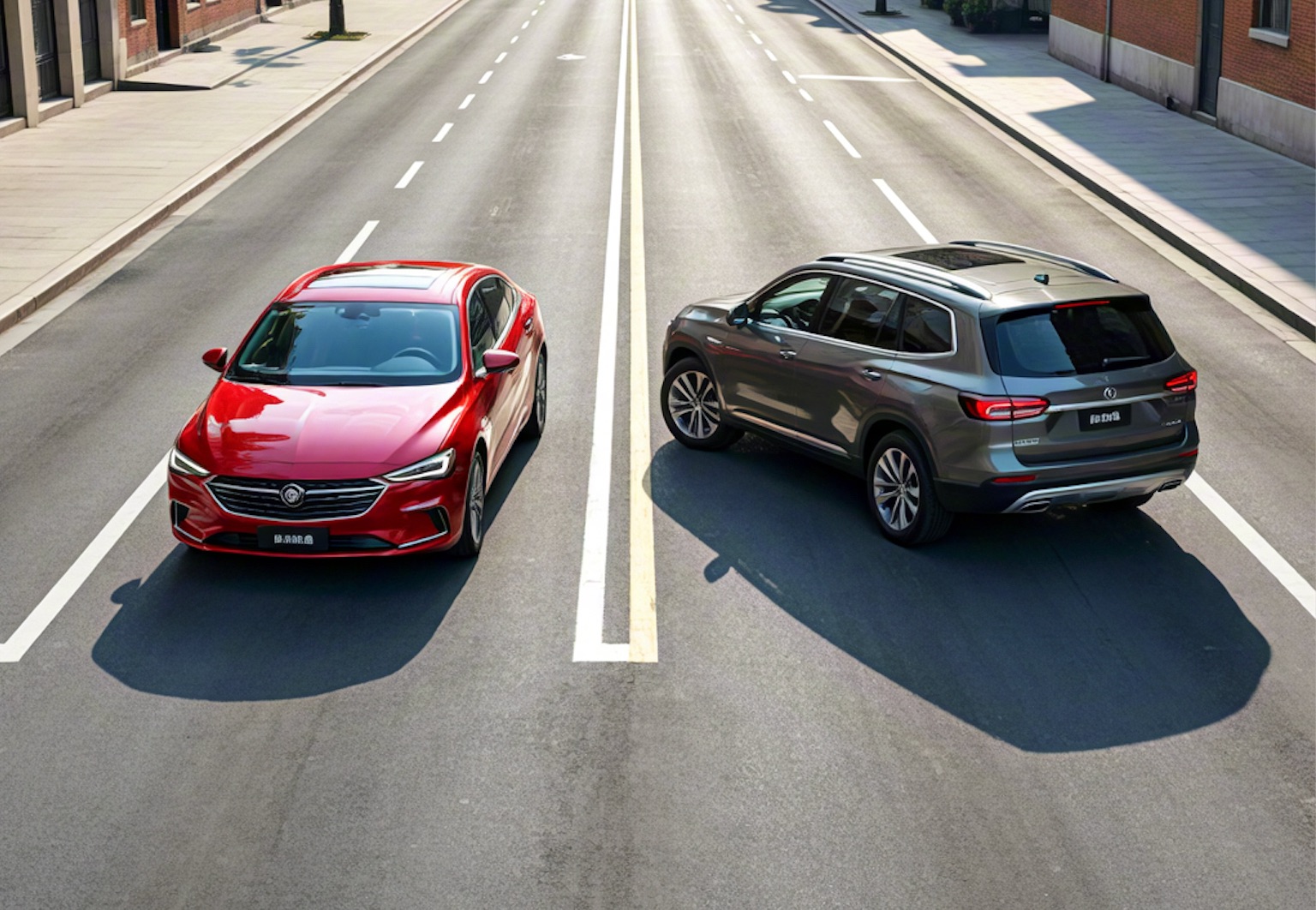
paddlex --pipeline vehicle_attribute_recognition --input vehicle_attribute_002.jpg --device gpu:0 --save_path ./output/
运行结果的示例输出如下:
{'res': {'input_path': 'vehicle_attribute_002.jpg', 'boxes': [{'labels': ['red(红色)', 'sedan(轿车)'], 'cls_scores': array([0.96375, 0.94025]), 'det_score': 0.9774094820022583, 'coordinate': [196.32553, 302.3847, 639.3131, 655.57904]}, {'labels': ['suv(SUV)', 'brown(棕色)'], 'cls_scores': array([0.99968, 0.99317]), 'det_score': 0.9705657958984375, 'coordinate': [769.4419, 278.8417, 1401.0217, 641.3569]}]}}
运行结果参数的含义可以参考下文"2.2.2 Python 脚本方式"中的结果说明。命令行方式支持同时指定多个设备进行并行推理,具体可参考 Pipeline 并行推理 文档。
可视化结果保存在 save_path 下。
2.2.2 Python 脚本方式
上述命令行方式主要用于快速体验与查看结果,在真实项目中通常需要通过代码进行集成。只需几行代码即可完成 Pipeline 的快速推理,推理代码与命令行方式得到的结果一致。仓库中提供的完整可运行示例见 api_examples/pipelines/test_vehicle_attribute_rec.py:
from paddlex import create_pipeline

pipeline = create_pipeline(pipeline="vehicle_attribute_recognition")

output = pipeline.predict(
    "./test_samples/vehicle_attribute_002.jpg", det_threshold=0.5, cls_threshold=0.7
)

for res in output:
    res.print()  # 打印预测的结构化输出
    res.save_to_img("./output")  # 保存结果可视化图像
    res.save_to_json("./output/")  # 保存预测的结构化输出
在上述 Python 脚本中,依次执行了以下步骤:
(1)通过 create_pipeline() 实例化车辆属性识别 Pipeline 对象,参数说明如下:
| Parameter | Parameter Description | Parameter Type | Default Value |
|---|---|---|---|
pipeline |
Pipeline 的名称或 Pipeline 配置文件的路径。如果是 Pipeline 名称,则必须是 PaddleX 支持的 Pipeline。 | str |
None |
config |
Pipeline 的具体配置信息(若与 pipeline 同时设置,其优先级高于 pipeline,且 Pipeline 名称需与 pipeline 保持一致)。 |
dict[str, Any] |
None |
device |
Pipeline 推理使用的设备,支持指定 GPU 的具体卡号,如 gpu:0;其他硬件卡号,如 npu:0;以及 CPU,如 cpu。支持同时指定多个设备进行并行推理,详见 Pipeline 并行推理。 |
str |
gpu:0 |
use_hpip |
是否启用高性能推理插件。若设为 None,则使用配置文件或 config 中的设置。 |
bool |
None |
hpi_config |
高性能推理配置。 | dict | None |
None |
(2)调用车辆属性识别 Pipeline 对象的 predict() 方法进行推理预测,该方法返回一个 generator。参数说明如下:
| Parameter | Parameter Description | Parameter Type | Options | Default Value |
|---|---|---|---|---|
input |
待预测数据,支持多种输入类型,必填。 | Python Var|str|list |
- Python Var:numpy.ndarray 表示的图像数据。- str:图像文件的本地路径,如 /root/data/img.jpg;URL 链接,如图片文件的网络地址;本地目录,目录中应包含待预测的图像,如 /root/data/。- List:列表元素须为上述类型,如 [numpy.ndarray, numpy.ndarray]、["/root/data/img1.jpg", "/root/data/img2.jpg"]、["/root/data1", "/root/data2"]。 |
None |
det_threshold |
车辆检测可视化的阈值。 | float | None |
- float:如 0.5,表示过滤掉所有得分小于 0.5 的检测框。- None:若设为 None,则使用 Pipeline 初始化时的默认值,初始化为 0.5。 |
0.5 |
cls_threshold |
车辆属性预测的阈值。 | float | dict | list | None |
- float:属性识别的统一阈值。 - list:如 [0.5, 0.45, 0.48, 0.4],表示按 label list 顺序对不同类别使用不同阈值。- dict:key 为 default 或 int 类型,value 为 float 阈值。如 {"default": 0.5, 0: 0.45, 2: 0.48, 7: 0.4},default 表示属性识别的统一阈值,其他 int 类型对 cls_id 为 0、2、7 的类别分别使用特定阈值。- None:若设为 None,则使用 Pipeline 初始化时的默认值,初始化为 0.7。 |
0.7 |
关于 cls_threshold 的三种传参形式,底层实现位于 paddlex/inference/models/image_multilabel_classification/processors.py 的 MultiLabelThreshOutput:float 会被广播为逐类别相同的阈值列表;dict 必须以 default 作为兜底阈值,再按类别 id 覆盖指定类别的阈值(要求 key 为小于类别数的整数);list 的长度必须等于类别总数。三种形式最终都会归一化为与类别数等长的阈值列表,再按 scores > threshold 筛选并降序排序输出属性标签。
(3)处理预测结果。每条样本的预测结果类型为 dict,支持打印、保存为图片、保存为 json 文件等操作:
| Method | Description | Parameter | Type | Description | Default Value |
|---|---|---|---|---|---|
print() |
将结果打印到终端。 | format_json |
bool |
是否用 JSON 缩进格式化输出内容。 |
True |
indent |
int |
指定缩进层级,美化输出的 JSON 数据。仅在 format_json 为 True 时有效。 |
4 | ||
ensure_ascii |
bool |
控制是否将非 ASCII 字符转义为 Unicode。True 时全部转义;False 时保留原字符。仅在 format_json 为 True 时有效。 |
False |
||
save_to_json() |
将结果保存为 JSON 文件。 | save_path |
str |
结果保存路径。指定为目录时,保存文件名与输入文件同名。 | None |
indent |
int |
指定缩进层级,美化输出的 JSON 数据。 |
4 | ||
ensure_ascii |
bool |
控制是否将非 ASCII 字符转义为 Unicode。 |
False |
||
save_to_img() |
将结果保存为图像文件。 | save_path |
str |
结果保存路径,支持目录与文件路径。 | None |
- 调用
print()方法时,结果将打印到终端,打印内容说明如下:input_path:(str)待预测图像的输入路径。page_index:(Union[int, None])若输入为 PDF 文件,表示当前页码;否则为None。boxes:(List[Dict])预测结果的类别信息集合。labels:(List[str])预测结果的类别名称。cls_scores:(List[numpy.ndarray])属性预测结果的置信度。det_scores:(float)车辆检测框的置信度。
- 调用
save_to_json()方法会将上述内容保存到指定save_path。指定目录时保存路径为save_path/{your_img_basename}_res.json;指定文件时直接保存到该文件。由于 JSON 文件不支持保存 numpy 数组,numpy.array类型会被转换为 list 格式。 - 调用
save_to_img()方法会将可视化结果保存到指定save_path。指定目录时保存路径为save_path/{your_img_basename}_res.{your_img_extension};指定文件时直接保存到该文件(Pipeline 通常包含多张结果图,不建议直接指定具体文件路径,否则多张图会相互覆盖,仅保留最后一张)。
此外,还支持通过属性获取带结果的可视化图像与预测结果:
| Attribute | Description |
|---|---|
json |
获取 json 格式的预测结果 |
img |
获取 dict 格式的可视化图像 |
- 通过
json属性获取的预测结果为dict类型,内容与save_to_json()方法保存的结果一致。 - 通过
img属性返回的预测结果是字典,keyres对应一个Image.Image对象,即展示属性识别结果的可视化图像。底层实现见 paddlex/inference/pipelines/attribute_recognition/result.py 的AttributeRecResult类,其_to_img方法会将 BGR 图像转为 RGB 后调用draw_attribute_result,在检测框旁绘制属性标签文本。
2.3 获取并自定义配置文件
你可以获取车辆属性识别 Pipeline 的配置文件并加载该配置进行预测。执行以下命令将结果保存到 my_path:
paddlex --get_pipeline_config vehicle_attribute_recognition --save_path ./my_path
获得配置文件后,只需将 create_pipeline 方法中的 pipeline 参数值修改为配置文件路径,即可自定义车辆属性识别 Pipeline 的设置,示例如下:
from paddlex import create_pipeline

pipeline = create_pipeline(pipeline="./my_path/vehicle_attribute_recognition.yaml")

output = pipeline.predict(
    input="./vehicle_attribute_002.jpg",
)
for res in output:
    res.print()
    res.save_to_img("./output/")
    res.save_to_json("./output/")
注意:配置文件中的参数是 Pipeline 的初始化参数。如果你想修改车辆属性识别 Pipeline 的初始化参数,可以直接修改配置文件中的参数并加载配置文件进行预测。此外,CLI 预测也支持通过 --pipeline 指定配置文件的路径来传入配置文件。
以 paddlex/configs/pipelines/vehicle_attribute_recognition.yaml 为例,可修改的关键字段包括:Detection 模块的 model_name(检测模型)、model_dir(微调后的检测模型权重路径)、threshold(检测阈值);Classification 模块的 model_name(属性识别模型)、model_dir(微调后的属性识别模型权重路径)、threshold(属性分类阈值),以及两个模块各自的 batch_size。
3. 开发集成与部署
如果 Pipeline 的推理速度和精度满足你的需求,就可以直接进行开发集成与部署。
如果需要将该 Pipeline 集成到 Python 项目中,可以参考上文"2.2.2 Python 脚本方式"中的示例代码。
此外,PaddleX 还提供了另外三种部署方式:
- 🚀 高性能推理:在实际生产环境中,许多应用对部署策略的性能指标有严格要求,尤其是响应速度,以保证系统高效运行与流畅的用户体验。为此,PaddleX 提供高性能推理插件,旨在深度优化模型推理与前后处理性能,显著加速端到端流程。详细的高性能推理流程请参考 PaddleX 高性能推理指南。
- ☁️ 服务化部署:服务化部署是实际生产环境中常见的部署形式。通过将推理能力封装为服务,客户端可通过网络请求访问服务获取推理结果。PaddleX 支持多种 Pipeline 服务化部署方案。详细的 Pipeline 服务化部署流程请参考 PaddleX 服务化部署指南。
以下是基础服务化部署的 API 参考与多语言服务调用示例:
API Reference
服务提供的主要操作说明:
- HTTP 请求方法为 POST。
- 请求体与响应体均为 JSON 数据(JSON 对象)。
- 请求处理成功时,响应状态码为
200,响应体属性如下:
| Name | Type | Description |
|---|---|---|
logId |
string |
请求的 UUID。 |
errorCode |
integer |
错误码,固定为 0。 |
errorMsg |
string |
错误信息,固定为 "Success"。 |
result |
object |
操作结果。 |
- 请求处理失败时,响应体属性如下:
| Name | Type | Description |
|---|---|---|
logId |
string |
请求的 UUID。 |
errorCode |
integer |
错误码,与响应状态码一致。 |
errorMsg |
string |
错误信息。 |
服务提供的主要操作如下:
infer:获取车辆属性识别结果。
POST /vehicle-attribute-recognition
- 请求体属性如下:
| Name | Type | Description | Required |
|---|---|---|---|
image |
string |
服务器可访问的图像文件 URL 或图像文件的 Base64 编码内容。 | Yes |
detThreshold |
number \| null |
含义参见 Pipeline 对象 predict 方法的 det_threshold 参数说明。 |
No |
clsThreshold |
number \| array \| object \| null |
含义参见 Pipeline 对象 predict 方法的 cls_threshold 参数说明。 |
No |
- 请求处理成功时,响应体的
result包含如下属性:
| Name | Type | Description |
|---|---|---|
vehicles |
array |
车辆位置与属性信息。 |
image |
string \| null |
车辆属性识别结果图,JPEG 格式,Base64 编码。 |
vehicles 中每个元素为 object,属性如下:
| Name | Type | Description |
|---|---|---|
bbox |
array |
车辆位置,数组中元素依次为左上角 x 坐标、左上角 y 坐标、右下角 x 坐标、右下角 y 坐标。 |
attributes |
array |
车辆属性。 |
score |
number |
检测分数。 |
attributes 中每个元素为 object,属性如下:
| Name | Type | Description |
|---|---|---|
label |
string |
属性标签。 |
score |
number |
分类分数。 |
多语言服务调用示例
Python
import base64
import requests
API_URL = "http://localhost:8080/vehicle-attribute-recognition" # 服务 URL
image_path = "./demo.jpg"
output_image_path = "./out.jpg"
使用 Base64 编码本地图像
with open(image_path, "rb") as file:
image_bytes = file.read()
image_data = base64.b64encode(image_bytes).decode("ascii")
payload = {"image": image_data}  # Base64 编码的文件内容或图像 URL
调用 API
response = requests.post(API_URL, json=payload)
处理响应数据
assert response.status_code == 200
result = response.json()["result"]
with open(output_image_path, "wb") as file:
file.write(base64.b64decode(result["image"]))
print(f"Output image saved at {output_image_path}")
print("\nDetected vehicles:")
print(result["vehicles"])
- 📱 端侧部署:端侧部署是将计算与数据处理能力直接放置在用户设备上的部署方式,设备可以在本地处理数据,无需依赖远程服务器。PaddleX 支持在 Android 等端侧设备上部署模型。详细的端侧部署说明请参考 PaddleX 端侧部署指南。
你可以根据需求选择合适的部署方式,将模型 Pipeline 集成到你的 AI 应用中。
4. 自定义开发
如果车辆属性识别 Pipeline 提供的默认模型权重在精度或速度上不满足你的需求,你可以尝试使用自己的领域数据或业务数据进行模型微调,以提升 Pipeline 在你所在场景下的识别性能。
4.1 模型微调
由于车辆属性识别 Pipeline 同时包含车辆检测模块与车辆属性识别模块,如果 Pipeline 整体效果不理想,问题可能出在任一模块。你可以分析识别效果较差的图片,判断问题出在哪个模块,并参照下表中的微调教程链接进行对应模块的模型微调:
| Scenario | Fine-Tuning Module | Fine-Tuning Reference Link |
|---|---|---|
| Inaccurate vehicle detection | Vehicle Detection Module | 车辆检测模块微调教程 |
| Inaccurate attribute recognition | Vehicle Attribute Recognition Module | 车辆属性识别模块微调教程 |
微调完成得到模型权重后,将其填写到 Pipeline 配置文件对应模块的 model_dir 字段,即可无缝替换 Pipeline 中的模块模型。修改后的配置文件示意如下:
pipeline_name: vehicle_attribute_recognition

SubModules:
  Detection:
    module_name: object_detection
    model_name: PP-YOLOE-L_vehicle
    model_dir: null # 替换为微调后的车辆检测模型权重路径
    batch_size: 1
    threshold: 0.5
  Classification:
    module_name: multilabel_classification
    model_name: PP-LCNet_x1_0_vehicle_attribute
    model_dir: null # 替换为微调后的车辆属性识别模型权重路径
    batch_size: 1
    threshold: 0.7
随后,你可以使用本地体验部分介绍的命令行或 Python 脚本方式加载修改后的 Pipeline 配置文件进行预测。
从模块配置文件可以进一步了解微调任务的默认设定:车辆检测模块配置见 paddlex/configs/modules/vehicle_detection/PP-YOLOE-L_vehicle.yaml(默认 num_classes: 4,即车辆检测的类别数);车辆属性识别模块配置见 paddlex/configs/modules/vehicle_attribute_recognition/PP-LCNet_x1_0_vehicle_attribute.yaml(默认 num_classes: 19,对应车辆属性标签空间,如颜色、车型等属性类别的多标签总维度)。微调时需根据数据集实际情况调整 num_classes、epochs_iters、batch_size、learning_rate、pretrain_weight_path 等训练参数。
5. 多硬件支持
PaddleX 支持多种主流硬件设备,包括 NVIDIA GPU、昆仑芯 XPU、昇腾 NPU、寒武纪 MLU 等。只需修改 --device 参数即可在不同硬件之间无缝切换。
例如,使用昇腾 NPU 进行车辆属性识别推理,命令如下:
paddlex --pipeline vehicle_attribute_recognition \
        --input vehicle_attribute_002.jpg \
        --device npu:0
如果希望在更广泛的硬件设备上使用通用车辆属性识别 Pipeline,请参考 PaddleX 多硬件使用指南。